Employee Settings
Configure employee ID generation and manage bulk imports from Settings → Employees.
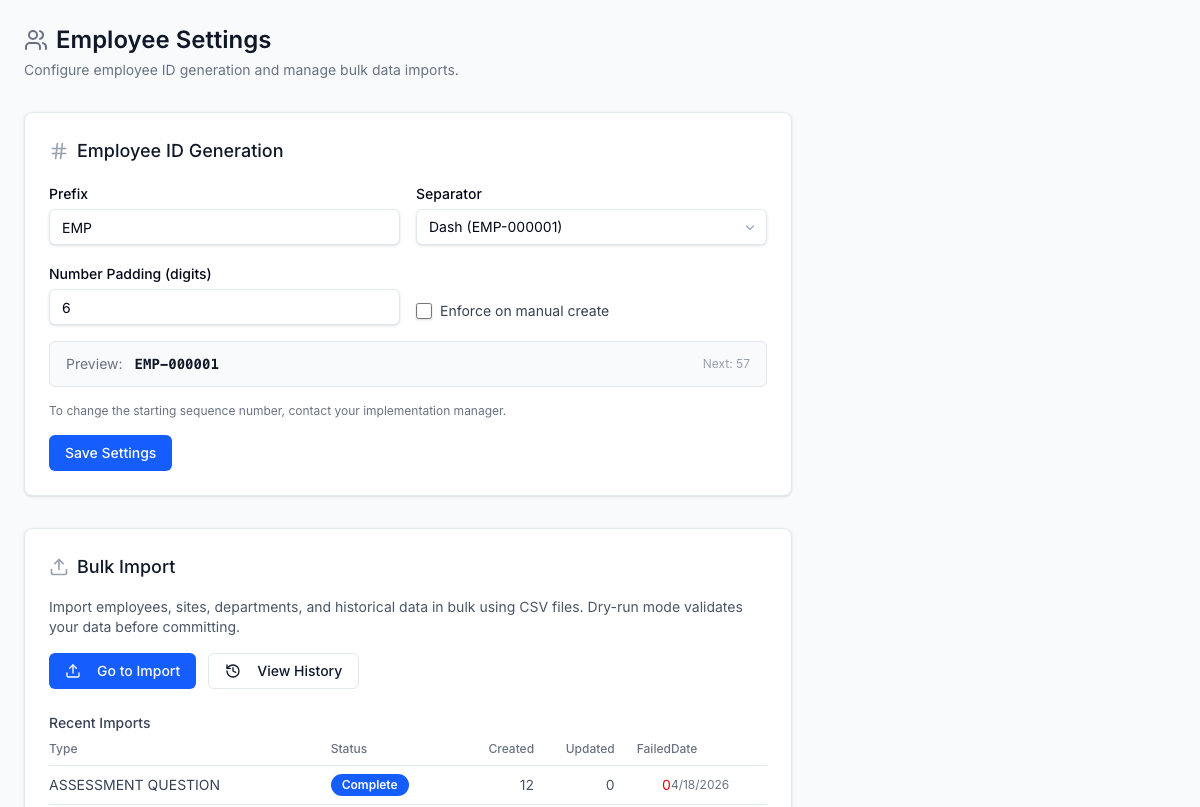
Employee ID generation
FrontLine auto-generates employee IDs based on a configurable pattern. The ID format is:
[PREFIX][SEPARATOR][PADDED_SEQUENCE]
For example, with prefix EMP, separator -, and padding 6: EMP-000001
Configuration options
| Setting | Description | Default |
|---|---|---|
| Prefix | Alphanumeric text (max 10 characters, auto-uppercased) | EMP |
| Separator | Character between prefix and number: dash (-), underscore (_), or none | - |
| Padding | Number of digits (1–8), zero-padded | 6 |
| Enforce on manual create | When enabled, manually created employees also receive auto-generated IDs | Off |
A live preview shows how the next ID will look as you adjust settings.
The current sequence number is displayed but cannot be changed through the UI. Contact your implementation manager if you need to adjust the sequence (e.g., to continue from an existing numbering system).
Bulk imports
The employee settings page also provides quick access to:
- Import Wizard — upload a CSV to create or update employee records in bulk
- Import History — view past import jobs with status, row counts, and error details
Recent imports
A summary table shows the last 5 import jobs with:
| Column | Description |
|---|---|
| Import type | What was imported (employees, departments, sites, etc.) |
| Status | COMPLETE, PROCESSING, PENDING, FAILED, or CANCELLED |
| Created / Updated / Failed | Row counts per outcome |
| Date | When the import was initiated |
Imports support a dry-run mode that validates the CSV without committing changes — useful for catching errors before a large import.